
I have mentioned before that at a different site I maintain an odd WordPress plugin named State of the Discussion that provides a comment-centric view of a site. With lj’s blessing, I installed it here at ObWi. It was as much a test to see if the code was actually portable as much as being an alternate way to follow the discussion. All the functionality seems to be working. A link to the relevant page is here. The rest of this post is a brief tutorial.

The basic idea is that all comments are available, in order from most recent to oldest. Access is in blocks of 48 comments. At the top and bottom of the SotD page is a pagination widget that allows the reader to move from one block to the next, or previous, or in jumps of a few blocks. When initially loaded, the most recent 48 comments are shown. Access to the first few blocks can be useful. Access to older stuff is clumsy. I think the original author might have had a pagination widget and just wanted to use it :^)

The next part of the page is a set of links to posts that the comments on the current view are attached to. The posts are color-coded. Comments — we’ll get there — use the same color code. In the box are: (1) the total number comments made on the post, in parentheses; (2) the title of the post, which is a link to that post’s page; and (3) the gravatar of the post’s author, if they have one (WordPress loves gravatars). Ignore the littler box with the plus sign, it’s an artifact left over from an earlier version.
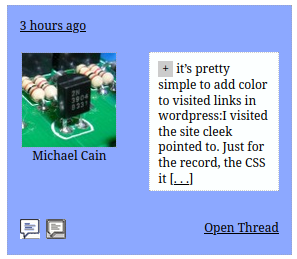
Then come 48 comment entries, each in its own box. Each box contains several parts. The topmost indicates how long ago the comment was submitted. There’s the gravatar of the comment author and the name they provided. If they filled out the website input when they submitted the comment, this name will be underlined and will be a link to that website. The white sub-box contains the first 25 or so words of the comment. The plus indicator will expand the box to show the full comment. The […] bit at the end will go to the post page, positioned at the comment. The post title in the lower right is a link to the post page, positioned at the top of the page. The little text balloons in the lower left are a bit more complicated.
The left one goes to a page with the full text of all of the comments that the comment author has submitted for the particular post, from newest to oldest. The other goes to the first page with all the comments the author has submitted forever, sorted first by posts (newest first), and then by the comment time (also newest first). These commenter lists are based on the e-mail address provided when a comment was submitted. If the author changes e-mail addresses from time to time, the lists will be incomplete. Lists for registered users may be incomplete because WordPress uses an identifier other than e-mail when a registered user is logged in. I occasionally use these lists when I know that someone put up a comment I wanted to respond to, but I’ve forgotten which post is was attached to.
State of the Discussion is oriented towards keeping track of what’s happening in general. The color coding makes it obvious when, for example, almost all of the discussion is happening on one or two posts. The “how long ago” information — as opposed to a timestamp — makes it easier to stop skimming through the list of comments when they get too old. The structure also makes it easy to see when a new comment shows up attached to an old post; such comments are often spam. I use SotD on occasions to watch for comments attached to my own posts, since I may need/want to respond to those. The layout doesn’t lend itself to use on a device with a small screen.
This looks really nice, thank you! I’ve added a link to the page at the top, next to About our mascot.
And just an observation about italics. If you look at the image I’m adding below, you can see that the middle comment has the italics but the ones on the left and right don’t. I’ve never been happy with how the site doesn’t italicize in the summary, so it looks like the author is saying something that they are quoting. The same problem happens in summarized posts on LGM (see here for an example).
What makes this a bit strange is that the middle one is what would be ideal, but the other two are not. Not sure if there is a fix, but just noticed it.
And just an observation about italics.
The WordPress built-in get_comment_excerpt() strips out formatting tags. The SotD code I inherited has its own comment excerpt code, and also strips out formatting tags unless the excerpt is the entire comment. That’s what happened in the middle comment in your picture.
I dig it immensely! Thanks to Michael and lj for all your work, and to anyone else who’s contributed to the blog’s continued existence.
oooh, nice. well done, Michael.
If the code in cwp.css is working correctly, these errors may not be significant. Functionally, they may not matter.
/* Original (Incorrect) */
padding: 6px; 6px; 8px; 6px;
/* Corrected */
padding: 6px 6px 8px 6px;
————
/* Original (Incorrect) */
// max-width: 40px;
// max-height: 42px;
/* Corrected */
/* max-width: 40px; */
/* max-height: 42px; */
————
/* Original (Incorrect) */
vertical-align: text;
/* Corrected */
vertical-align: text-bottom;
————
/* Original (Incorrect) */
width: 100%
font-size: 18px;
/* Corrected */
width: 100%;
font-size: 18px;
Thanks, Charles. As I’ve mentioned, I inherited this when it was orphaned by the original author. I’ve kept it running, but have never been through it systematically to clean up. I know there’s a bunch of CSS that only applies when the widget (as opposed to page) version is run, and I suspect there’s some CSS that’s just dead. Once I get past the holidays, I’ll apply these corrections and I also intend to address lj’s complaint about the comment excerpts.
ETA: And it doesn’t come anywhere close to the current practices for things that ought to be included in plugins.
Here’s more. 🙂
stylesheet.css
main.min.css
Question: How do you insert line breaks into a comment without causing it to post?
This is great, as an add-on not as a replacement, which is what I assume was the intention? Does this now happen automatically, or does someone have to do things to it intermittently? If the former, win-win!
This is great, as an add-on not as a replacement, which is what I assume was the intention? Does this now happen automatically, or does someone have to do things to it intermittently?
It’s a very non-traditional add-on, intended to let someone get a feel for what’s going on. State of the Discussion, not the discussion itself. CK MacLeod, the original author, figured out how to organize a lot of information into a little space. To be honest, despite the links back to the real pages, it tempts someone to jump straight to comments w/o reading the post proper first. That’s a potentially serious downside. There’s a widget version of the code that might be better, added at the bottom of the right-hand sidebar.
Every invocation generates a new page that’s up-to-date. Speaking broadly, it doesn’t require any attention except sometimes following a WordPress or PHP update. I got involved at the other site where it runs after cumulative updates had broken it completely.
Question: How do you insert line breaks into a comment without causing it to post?
You can’t just hit enter?
When I’ve hit Enter or pressed <Ctrl> + Enter, the comment is posted.
But Enter works now, <Ctrl> + Enter doesn’t do anything.